Last modified 2011-10-28; added box option
The Hebrew pop-up keyboard on the YI site search box was always hard-coded and kind of obtrusive, so I wanted to make a jQuery plugin to add a keyboard to any input type="text" or textarea. To make it more flexible, I factored it into a general-purpose popup widget and the keyboard itself.
$.ui.textpopup
The $.ui.textpopup widget is meant to be a base class for real popup widgets. It requires jQuery UI 1.7 and my subclassing code. The subclass needs to override the _fill method to fill the box with the desired controls. For example:
<div id="example1">
	Example 1: <input>
</div>
$.widget("ui.helloWorld", $.bililite.textpopup, {
	_fill: function(box){
		var self = this;
		$('<input type="button" value="Hello, World" />').appendTo(box).click(function() {
			self.element.val('Hello, World')
		});
	}
});

$('#example1 input').helloWorld();
textpopup has the following options:
- show {Function}
- Called to show the popup; this is set to the popup div and
the speed is the argument(s) (this is meant to be a function called like $.fn.show).
- hide {Function}
- Called to show the popup; this is set to the popup div and
the speed is the argument(s) (this is meant to be a function called like $.fn.hide)
- box {jQuery object|undefined}
- Element to contain the popup box. If undefined, a new, absolutely-positioned <div> is created. Set this to create an "inline" popup.
- shown {Function}
- Callback (this is set to the input element) called when show is completed
Also available as the custom event textpopupshown
- hidden {Function}
- Callback (this is set to the input element) called when hide is completed
Also available as the custom event textpopuphidden
- created {Function}
- Callback (this is set to the input element) called when the popup is created. Signature is
Function(Event, box {jQuery object})
Also available as the custom event textpopupcreated
- speed {String|Number|Array}
- Parameter to pass to show/hide above. If it is an array, it is passed with apply
so you can pass multiple arguments.
For instance, to use jQuery UI effects, use
speed: ['slide', {direction: 'right'}, 'slow']
- hideOnOutsideClick {Boolean}
- true to hide the popup if the mouse is clicked outside the popup or the target element
- position {'tl'|'lt|'bl'|'lb'|'tr'|'rt'|'br'|'rb'|Object}
- String that indicates where to position the popup
relative to the textbox. 'tl' means on top of the input box, aligned to the left edge;
'lt' means on the left of the input box aligned to the top edge; similarly 'b' for bottom
and 'r' for right. If an object is passed, it will be passed unchanged to
position, except that if the of option
is not specified, it will be set to this.element
- trigger {'self'|null|String|jQuery|DOM element}
- Element(s) to use as the trigger to show the
popup. uses the code
if (trigger == 'self') trigger = self.element; if (trigger) $(trigger).click(function(){self.show()})
- class {String}
- class to be added to the popup box
// Default values
$.ui.textpopup.prototype.options = {
	show: $.fn.show,
	hide: $.fn.hide,
	speed: 'slow',
	hideOnOutsideClick: true,
	position: 'tl',
	trigger: 'self',
	'class': 'ui-textpopup-box'
};
Note that the event names prepend the actual name of the widget, so if you subclass textpopup, use the new name. Thus $.ui.textpopup.subclass('foo'); $(selector).foo().bind('fooshown', function(){});.
Examples of position:
<div id="example2">
<div><strong>tl</strong><input/></div>
<div><strong>lt</strong><input/></div>
<div><strong>br</strong><input/></div>
<div><strong>rb</strong><input/></div>
<div><strong>lb</strong><input/></div>
</div>
$('#example2 input').each(function(){
  $(this).css({height: '50px'}).helloWorld({position: $(this).prev().text()});
});

$('#example2 div, #example2 span').css({margin:'2px'});
<div id="example3">
<div><strong>Slide Right</strong><input/></div>
</div>
$('#example3 input').each(function(){
  $(this).css({height: '50px'}).helloWorld({
    speed: ['slide', {direction: 'right'}, 'slow'],
    position: {my: 'bottom', at: 'top'}
  });
});

$('#example3 div, #example3 span').css({margin:'2px'});
Callable functions include (obviously, use the name of the subclass you created):
- $(...).textpopup('show') and $(...).helloWorld('hide')
- show and hide the popup. These return the jQuery object.
- $(...).textpopup('box')
- returns the popup div as a single-element jQuery object
- $(...).textpopup('position')
- repositions the popup. Use this if the size of the popup changes. Returns the jQuery object.
Example of using callable functions and the trigger option:
<div id="example4">
	<label>Example 4 hidden:</label><br/><input id="input4">
</div>
$('<span> Hide </span>').css({outline: 'black dotted thin'}).insertAfter('#input4').click (function(){
  $('#input4').helloWorld('hide');
});
var triggerElement = $('<span> Show </span>').css({outline: 'black dotted thin'}).insertAfter('#input4');
$('#input4').helloWorld({
  hideOnOutsideClick: false,
  position: {my: 'right', at: 'left'},
  speed: ['fold', {}, 1000],
  trigger: triggerElement,
  shown: function() {$('#example4 label').text('Example 4 visible:')},
  hidden: function() {$('#example4 label').text('Example 4 hidden:')}
});
$('#input4').helloWorld('box').css('border', '2px outset #eee');
$.ui.hebrewKeyboard
The $.bililite.hebrewKeyboard is just a subclass of $.bililite.textpopup that uses AJAX to load a Hebrew keyboard into the popup div and $.fn.sendkeys to insert the Hebrew characters.
Inspired by Ilya Lebedev's VirtualKeyboard, the plugin also catches keystrokes to allow typing directly in Hebrew, using the CapsLock key as a toggle between English and Hebrew keyboards.
<div id="example5">
	Example 5 (Hebrew): <input id="input5">
</div>
$('#input5').hebrewKeyboard();
It works with contenteditable="true" elements as well:
<div id="example6" contenteditable="true" >
	Example 6 (Hebrew): Edit me!
</div>
$('#example6').hebrewKeyboard();
Download the html for the keyboard.
The keyboard uses CSS sprites and a single image:
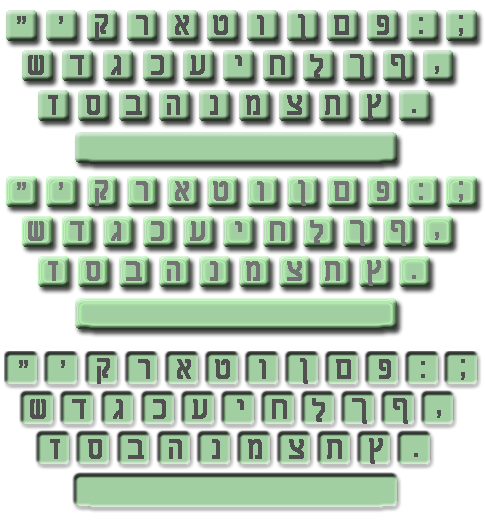
to simulate the keypresses. IE (of course) can't handle a:hover styling unless there's a real link,
so each key has a pretend href="javascript:insertLetter", but really uses $('a').click(function(){sendkeys...return false;})

Isaac says:
First off, thanks for sharing the great stuff you made!
Second, I noticed that when moving from one element that has popup text to another (as well as the hebrew keyboard obviously) the first one does not get hidden. Am I missing something or does this have to be changed in the code?
Thanks.
March 24, 2011, 1:56 pmDanny says:
@Isaac:
March 24, 2011, 4:27 pmYou are right; the “hide on click outside” code attaches a click event to the body, and other textboxes don’t bubble their events back up to the body. It never bothered me terribly, so I never changed it. I suppose you could watch for a blur event on the element and the popup and hide then. If you come up with an elegant answer, please let me know!
–Danny
Isaac says:
Danny,
Thanks for getting right back to the comment, although I cannot attest to it’s elegance, what I ended up doing locally (outside of the script) that addressed the issue was as follows.
I commented although I am sure you are capable of figuring it out on your own :-).
Let me know if I went wrong on anything
Thanks again..
Here is the script – using multiple hebrew keyboard input fields as example.
March 26, 2011, 9:09 pm//initially set the value to true so that when the popup is first clicked on, it does not dissapear
mouse_inside=true;
//calling the hebrew keyboard on all fields with the hebrew-input class
$(‘.hebrew-input’).hebrewKeyboard();
//make the keyboard disappear when the input field loses focus – except when the mouse
//is hovering over the keyboard.
$(‘.hebrew’).focusout(function() {
//simple function to set mouse_inside based on it hovering over the textpopup area
// I suppose the following mouse test could have been done on the document.ready area, but I see no //harm in keeping it local
$(‘.ui-textpopup-box’).hover(function(){
mouse_inside=true;
}, function(){
mouse_inside=false;
});
//hides the popup when mouse is no longer inside
if(! mouse_inside) $(‘.ui-textpopup-box’).hide();
//once the popup is hidden, change the mouse_inside back to true, otherwise the next time the popup //is called, it will disappear as soon as it is clicked on
mouse_inside=true;
});
Isaac says:
I just noticed that on the second time around, I left the class as plain ‘hebrew’, it was supposed to be ‘hebrew-input’.
March 26, 2011, 9:12 pmThe way I put the comments also came out messed up.
Sorry.
Danny says:
@Isaac:
March 28, 2011, 9:32 amThanks for the feedback. My main concern is that the show/hide work with keyboard entry as well as with mouse clicks, and I suspect I would have to play with focus events, which are triggered after the blur events. This makes is hard to determine if the focus shifts from the input box to the popup, in which case you would not want to hide the popup.
I may look at this later; right now I’m playing with PDF‘s.
–Danny
Subrata Dhal says:
Thanks for the .hebrewKeyboard(); function. I need hebrew keyboard and English keyboard both are in same window. Can i use this function as English keyboard with English keygraphics? without on caps lock hebrew keyboard and English keyboard both are visible and both type for same input field. When i click on hebrew keyboard it type hebrew font and English keyboard for english text.
subrata
January 19, 2013, 10:55 amDanny says:
@Subrata Dhal:
January 20, 2013, 7:16 amthe hebrew keyboard is just that, but if you look at the code for the Hebrew Keyboard (in http://bililite.com/inc/keyboard.html) to create the equivalent for English. You would have to create your own graphics as well.
You could look at the Javascript Virtual Keyboard for a keyboard that handles multiple languages automatically.
–Danny